
iBOX iBOX-210 Mini PC Quick Installation Guide

Quick installation guide for the iBOX-210 mini PC, covering internal component installation and cover replacement.

iBOX iBOX-210 Mini PC Quick Installation Guide - cover page
Brand
i-box
Category
Mini Box Camera
Document type
Installation Guide
Language
English
Pages
2
File format
PDF
File size
949 KB
Published
31 October, 2026
Updated
31 October, 2026
MD5 checksum
1F4143EDA7982554BFBA89087133BC61

About this manual

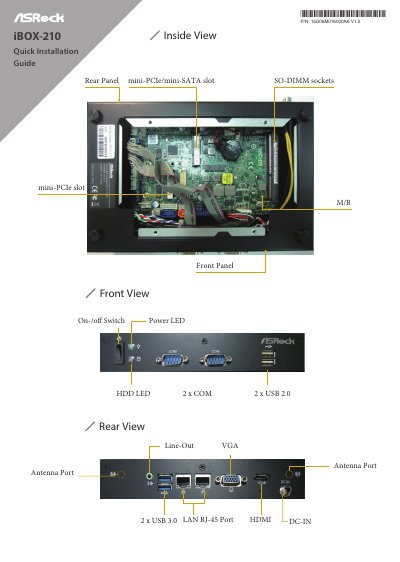
This document provides a quick installation guide for the iBOX-210 mini PC. It details the procedure for removing the bottom cover and installing internal components, including SO-DIMM memory, hard drives, and WiFi modules.

What's inside

  • Removing the Bottom Cover
  • Installing the SO-DIMM
  • Installing the Hard Drive
  • Installing the WiFi module
  • Installing the WiFi antennas
  • Replacing the Bottom Cover

Frequently asked questions

What ports are on the front panel of the iBOX-210?

The front panel has 2 x USB 2.0, 2 x USB 3.0, HDMI, VGA, and a Line-Out port.

What is the first priority SO-DIMM slot for installation?

The first priority SO-DIMM slot is DDR3_A2.

How many screws are needed to remove the bottom cover?

Four screws are needed to remove the bottom cover.

What is the purpose of the antenna ports on the rear panel?

The antenna ports are for connecting WiFi antennas to improve signal strength.

Download PDF (949 KB)