
User manual for the Huawei E5885 Mobile WiFi Pro2 covering appearance, SIM/SD card installation, network connection, HiLink app, NFC and charging.
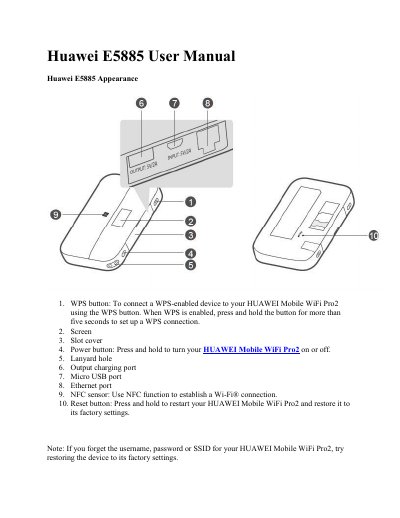
This user manual describes the Huawei E5885, also known as the HUAWEI Mobile WiFi Pro2. It explains the device's buttons and ports, including the WPS button, power button, micro USB port, Ethernet port, NFC sensor and reset button, and shows how to install the SIM card and SD card and connect to a network.
The manual also covers changing the default SSID and Wi-Fi network key, using the device as a router with a network cable, managing it with the HUAWEI HiLink app or the web interface at http://192.168.8.1, connecting via NFC, using the Wi-Fi extender feature, charging other devices with the charging strap or cable, and troubleshooting tips for common issues.
Try restarting the device. If that doesn't work, restore the device to its factory settings.
The Wi-Fi auto off feature turns off Wi-Fi when there have been no connections for a while to save power. Press the POWER button to turn Wi-Fi on again, or disable the feature in the web interface.
This is likely due to an IP address conflict when the device assigns itself a new IP address. Try 192.168.9.1 instead; if the device has an LCD screen, the new IP address will be displayed.
With NFC enabled and the HUAWEI HiLink app installed, touch your unlocked phone or tablet against the NFC sensor on the device. When detection succeeds, the HiLink app opens and you are connected to Wi-Fi.