
HP DeskJet 2300 All-in-One Printer Series User Manual

This manual provides instructions for the HP DeskJet 2300 All-in-One Printer, including control panel usage, basic troubleshooting, and warranty information.
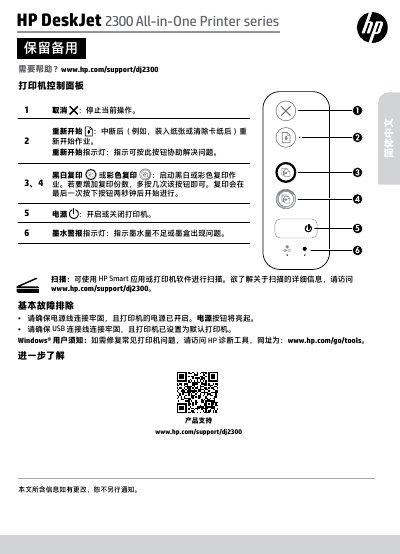

HP DeskJet 2300 All-in-One Printer Series User Manual - cover page
Brand
HP
Category
Printer
Document type
User Manual
Language
Chinese
Pages
4
File format
PDF
File size
391 KB
Published
15 October, 2026
Updated
15 October, 2026
MD5 checksum
A76B30A3E4CC92E3458F368A47488460

About this manual

This document serves as the user manual for the HP DeskJet 2300 All-in-One Printer series. It details the functions of the printer control panel, including buttons for canceling jobs, restarting operations, copying, and scanning. It also provides guidance on connecting the power and USB cables and accessing HP diagnostic tools for Windows users. This manual is written in Chinese.

What's inside

  • Printer Control Panel
  • Basic Troubleshooting
  • Limited Warranty Statement
  • Warranty Scope
  • Liability Limitation
  • Local Law

Frequently asked questions

What is the warranty period for the printer hardware?

The printer hardware is covered by a 1-year limited warranty.

How long is the warranty for the software media?

The warranty for software media lasts for 90 days.

What happens if the printer malfunctions due to using non-HP ink cartridges?

HP will charge standard labor and material fees for repairs caused by using non-HP ink cartridges.

Download PDF (391 KB)

More HP Manuals


View all HP manuals →