
Media guide for the HP 650-sheet dual input tray, listing supported paper sizes, storage, and loading tips.
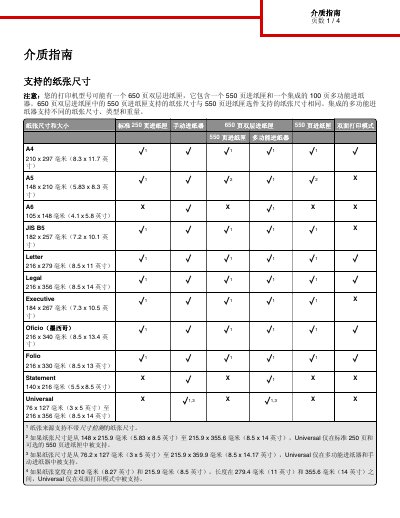
This media guide covers the HP 650-sheet dual input tray, which contains a 550-sheet tray and an integrated 100-sheet multifunction tray. It lists supported paper sizes for the standard 250-sheet tray, manual feed, 550-sheet tray, duplex mode, and multifunction tray.
It also gives paper storage recommendations and loading practices intended to help avoid paper jams and unstable print quality. This manual is written in Chinese.
| Tray configuration | 550-sheet tray plus integrated 100-sheet multifunction tray |
|---|---|
| Recommended paper storage temperature | 21°C (70°F) |
| Recommended paper storage relative humidity | 40% |
| Label printing temperature range | 18–24°C (65–75°F) |
| Label printing relative humidity range | 40 to 60% |
It contains a 550-sheet tray and an integrated 100-sheet multifunction tray.
For best results, store paper at 21°C (70°F) and 40% relative humidity; label manufacturers recommend 18–24°C (65–75°F) and 40 to 60% relative humidity.
Load paper flat, do not overload the tray, align the guides, and push the tray firmly into the printer.