
Key facts
- Manuals
- 1
- Languages
- ZH
- Last added
- 2026-09-29
Featured 红蜘蛛 manuals
红蜘蛛 PG-9121 Single-Hand Controller User Manual
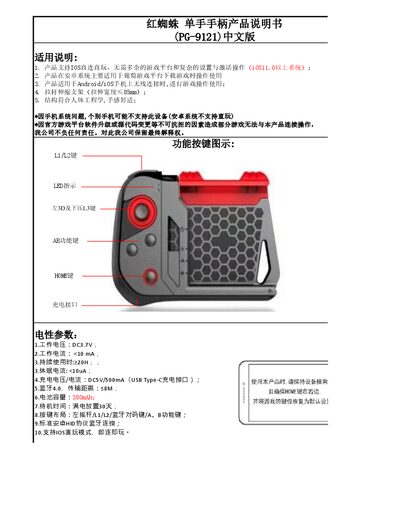
The PG-9121 controller is a compact, ergonomically designed single‑hand gamepad that connects wirelessly to Android and iOS smartphones via Bluetooth 4.0. It features a left joystick, L1/L2 buttons, a Bluetooth pairing key, and A/B function keys, with a USB‑C charging port.
The manual explains how to pair the controller in iOS direct‑play mode (B + HOME) or Android HID mode (A + HOME), outlines power‑saving behavior such as automatic shutdown after 10 minutes of inactivity, and provides safety and compatibility notes for various mobile platforms. This manual is written in Chinese.
Covers: Electrical Parameters · Compatibility and Usage · Button Layout · Pairing Modes · LED Indicators · Power Management
Latest 红蜘蛛 manuals
红蜘蛛 PG-9121 Single-Hand Controller User Manual
User Manual 8 pages · 358 KB · ZHThe PG-9121 single‑hand controller from 红蜘蛛 offers Bluetooth 4.0 connectivity, a 380 mAh battery, and supports iOS direct‑play and Android HID modes.
Which document do I need?
User Manual
Day-to-day operation, settings and troubleshooting. Start here if the product is already set up.
Questions answered in 红蜘蛛 manuals
How do I pair the controller with an iOS device?
Press B + HOME for 2 seconds to enter V3 direct‑play mode; the LED1 flashes, then select “PG‑9121” on the phone to connect.
How do I pair the controller with an Android device?
Press A + HOME for 2 seconds to enter Android pairing mode; the LED2 flashes, then select “PG‑9121” on the device to connect.