
Quick installation guide for Hitachi's 100-GTCHIT Gateway Cable, covering wiring, power, and system setup.
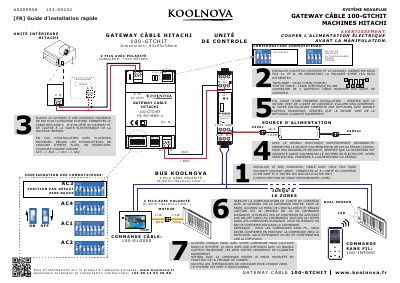
This guide provides step-by-step instructions for installing the Hitachi 100-GTCHIT Gateway Cable. It covers connecting the cable between the control unit and gateway, configuring master commands, verifying LED indicators, and powering the system. The cable supports up to 16 zones and uses RS-485 topology. Safety warnings and wiring specifications are included. This manual is written in French.
| Dimensions | 93x53x58mm |
|---|---|
| Cable Type | RS-485 |
| Max Zones | 16 |
| Max Gateways per Unit | 4 |
| Cable Section | 0.5mm² to 1mm² |
| Default Baud Rate | 9600 |
The maximum distance between the gateway and the internal unit is 500 meters.
For touch commands, press ON-OFF; for ELEGANCE commands, press ENTER. You will hear a confirmation beep.
Use a 24V DC power supply connected to a 220V AC network. Verify the connection before powering on.