
Installation guide for the WLGLQ-II-D isolation card by Guangzhou Graphic Technology, detailing setup, connections, and usage.
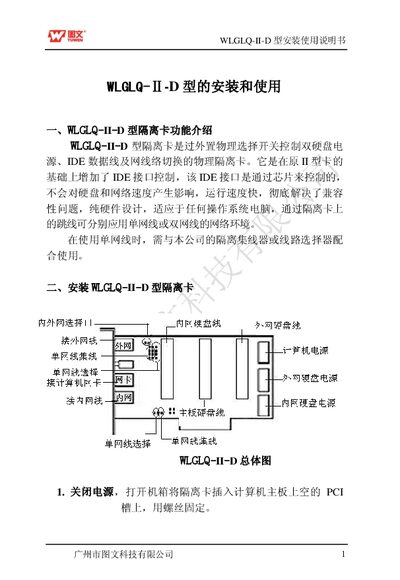
The WLGLQ-II-D isolation card provides hardware‑level switching of dual hard‑drive power, IDE data lines, and network connections via an external physical selector. It adds IDE interface control to the earlier II‑type card, uses chip‑controlled switching that does not affect drive or network speed, and works with any operating‑system computer.
The manual explains how to install the card in a PCI slot, connect IDE and power cables, and configure single‑ or dual‑network setups using jumpers and RJ‑45 ports. It also covers the optional external or internal selection switch and provides usage instructions for switching between internal and external networks. This manual is written in Chinese.
| Interface Slot | PCI |
|---|---|
| IDE Control Method | Chip‑controlled, no speed impact |
| Network Mode | Single or dual Ethernet via jumpers |
| Switch Types | External and internal selectable |
| RJ‑45 Ports | Labeled “内网” and “外网” |
Turn off the power, open the computer case, insert the card into the PCI slot, and secure it with a screw.
Set the selection switch to the “内” side for the internal network or the “外” side for the external network before powering on; for single‑network use the appropriate jumper.
Connect the motherboard IDE line to the card’s port labeled “主板 IDE”, and connect the supplied IDE cables to the card’s internal and external IDE interfaces for the hard drives.