
Quick start guide for GLP Creative Light 1 Plus: wireless, battery-powered RGB lighting fixture with 24 pixels, IR remote, app control, and DMX via…
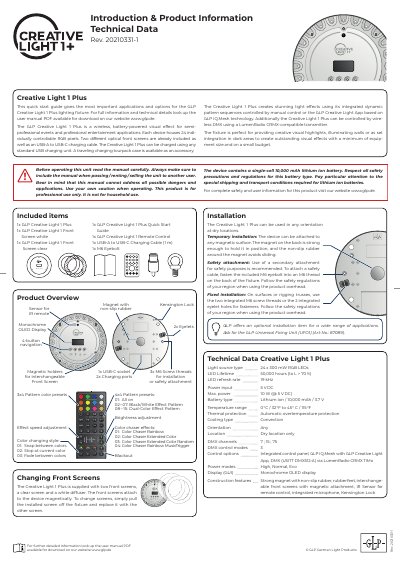
The GLP Creative Light 1 Plus is a wireless, battery-powered RGB lighting fixture with 24 individually controllable pixels. It includes two interchangeable front screens and can be controlled manually via IR remote, through the GLP Creative Light App using GLP iQ.Mesh technology, or wirelessly via DMX using a LumenRadio CRMX-compatible transmitter. It’s designed for semi-professional events and professional entertainment, offering dynamic lighting effects with minimal equipment size and low cost.
The device features a monochrome OLED display, magnetic front screens, and safety features including M6 screw threads and eyelets for secure mounting. It can be charged via USB-C and includes safety instructions for battery handling and operation. The unit comes with a quick start guide, remote control, and charging cable. This manual is written in Chinese.
| Light Source Type | 24 x 300 mW RGB LEDs |
|---|---|
| Battery Type | Lithium Ion / 10,000 mAh / 3.7 V |
| Temperature Range | 0°C / 32°F to 45°C / 115°F |
| DMX Channels | 7; 15; 75 |
| Control Options | Integrated control panel, GLP iQ.Mesh with GLP Creative Light App, DMX (USITT DMX512-A) via LumenRadio CRMX TiMo |
| Power Modes | High, Normal, Eco |
Charge the device using a standard USB charging power supply (minimum 1 amp) or the optional GLP Creative Light Docking Station. First LED pixel flashing green indicates charging in progress; constant green indicates 100% charged.
It is a wireless, battery-powered visual effect for semi-professional events and professional entertainment applications.
Pull the installed screen off the fixture and replace it with the other screen; the screens attach magnetically.
Use a standard USB charging power supply with minimum 1 amp power, or the optional GLP Creative Light Docking Station.