
Fujitsu F9600 DT14DS Wireless Telephone Quick Reference Guide

This guide provides quick reference function key strokes, default settings, and basic usage instructions for the Fujitsu F9600 DT14DS wireless telephone.
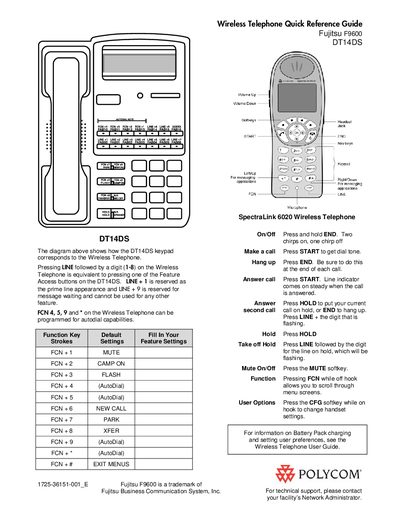

Fujitsu F9600 DT14DS Wireless Telephone Quick Reference Guide - cover page
Brand
Fujitsu
Category
Other Electronics
Document type
Quick Start Guide
Language
English
Pages
1
File format
PDF
File size
80 KB
Published
13 October, 2026
Updated
13 October, 2026
MD5 checksum
13B9F79572476EF70BFFA1E903B3D4CD

About this manual

This document serves as a quick reference guide for the Fujitsu F9600 DT14DS wireless telephone. It details function key strokes for features such as Mute, Camp On, Flash, New Call, Park, Xfer, and Exit Menus, along with default settings and instructions for making and hanging up calls.

What's inside

  • Function Key Strokes
  • Default Settings
  • Make a call
  • Hang up
  • Answer call
  • Hold
  • Mute
  • Function
  • User Options
  • SpectraLink 6020 Wireless Telephone

Frequently asked questions

How do I make a call?

Press START to get dial tone.

How do I hang up?

Press END.

How do I answer a call?

Press START. The line indicator comes on steady when the call is answered.

How do I put a call on hold?

Press HOLD to put your current call on hold.

Download PDF (80 KB)

More Fujitsu Manuals


View all Fujitsu manuals →