
Festo Didactic 52845 Creating Logic Programs for the Handling Station

Instructions for creating logic programs in FluidSIM to control a Festo Didactic handling station using pneumatic and electrical circuits.

Festo Didactic 52845 Creating Logic Programs for the Handling Station - cover page
Brand
Festo Didactic
Category
Industrial Robot
Document type
User Manual
Language
English
Pages
6
File format
PDF
File size
662 KB
Published
05 November, 2026
Updated
05 November, 2026
MD5 checksum
1646B62B5A6AEE1A7C176F92D9795AB2

About this manual

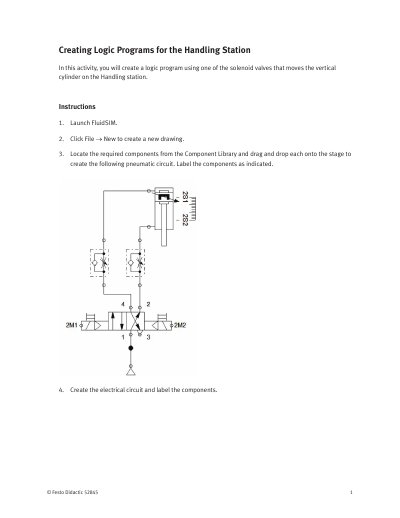
This document provides step-by-step instructions for creating a logic program using the FluidSIM software to control a handling station. The guide covers building a pneumatic circuit with solenoid valves and a vertical cylinder, as well as designing the corresponding electrical circuit.

What's inside

  • Launch FluidSIM
  • Create pneumatic circuit
  • Create electrical circuit
  • Logic module components
  • Step 1 sequence
  • Step 2 sequence
  • Step 3 sequence
  • Connect to Multi-pin distributor
  • Simulate and run program

Frequently asked questions

What software must be launched to create the logic program?

Launch FluidSIM.

Which components are used for Step 1 of the logic program?

Inputs: pushbutton (I2) and sensor 2S1 (I3). Output: solenoid valve 2M1 (Q3).

What does Step 2 activate when the piston is in its extended position?

Step 2 activates the cylinder and resets Step 1.

What must be done to test the program using the Handling station?

Make sure the input and output components are connected to the Multi-pin distributor as follows.

Download PDF (662 KB)

More Festo Didactic Manuals


View all Festo Didactic manuals →