
The eSTREAM 4K Control User Guide covers battery installation, remote layout, TV and STB pairing, and IR code setup for the eSTREAM 4K remote control.
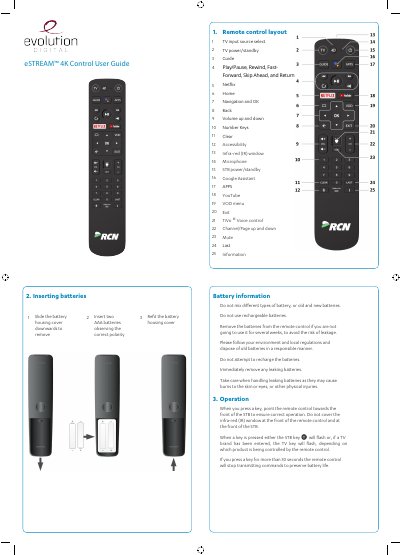
This user guide covers the eSTREAM 4K Control remote control, including how to insert batteries, use the remote control layout, and select TV input sources. It describes buttons such as Netflix, YouTube, Google Assistant, and TiVo voice control.
The guide also explains how to control the TV using brand search or auto search, pair the remote with the STB manually or automatically, use learning mode to copy keys from another remote, and reset to factory settings. A table of TV IR codes is provided for programming the remote to different TV brands.
| Battery type | two AAA batteries |
|---|---|
| Keypress timeout | 30 seconds |
| Pairing timeout | 60 seconds |
Slide the battery housing cover downwards to remove it, insert two AAA batteries observing the correct polarity, then refit the battery housing cover.
The default brand code is 1150 for Samsung.
Yes, it can learn functions for the TV, TV input, VOL+, VOL-, and MUTE keys from a source remote control.
Pairing mode times out after 60 seconds.