
Troubleshooting guide for the ELMO TT-02RX document camera covering image output, camera head, power LED and RGB pass‑through issues.
This guide provides step‑by‑step troubleshooting for the ELMO TT-02RX document camera. It lists common problems, their most likely causes, and recommended solutions or service actions.
Key issues covered include no image output, a camera head that will not stay horizontal, a flashing blue power‑button LED, and the lack of RGB pass‑through when the unit is powered off. The guide also notes expected behavior for certain serial‑number ranges and references additional technical bulletins and service instructions.
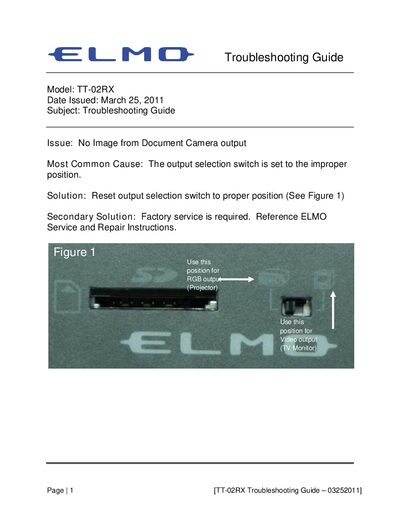
| RGB output position | Projector |
|---|---|
| Video output position | TV Monitor |
| Units with serial numbers 400001–583529 | No RGB pass‑through when powered off (expected behavior) |
The output selection switch is set to the wrong position; reset it to the proper position as shown in Figure 1.
Loose screws in the camera stay assembly are the usual cause; refer to the ELMO Technical Bulletin 092710 for repair instructions.
It usually means the AC adapter is faulty; replace it with a known good adapter to verify operation.
For TT‑02RX units with serial numbers 400001–583529 this behavior is normal and no action is required.