
This manual provides instructions for activating H&M program parameters on the Electrolux W555 standard program washer for fabric testing.
The Electrolux W555 Standard Program Washer is designed to test the dimensional or color stability of fabrics or garments after washing. It measures shrinkage or elongation rates after one or multiple home-style washes and allows for visual assessments of various washing results. This document specifically guides technicians on how to activate the H&M program parameters (speed and water level) required for standard testing procedures. This manual is written in Chinese.
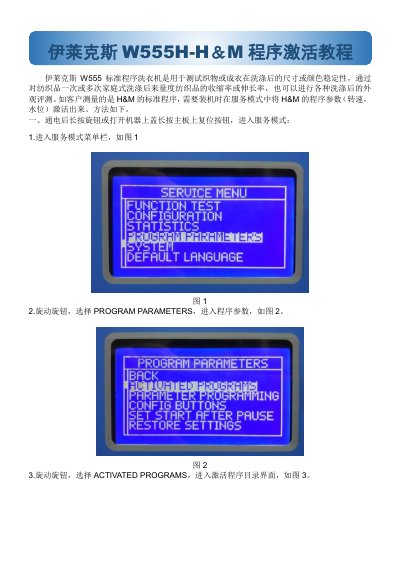
After powering on, press and hold the knob or the reset button on the main board while opening the machine cover.
Navigate to 'PROGRAM PARAMETERS', then 'ACTIVATED PROGRAMS', select the entry with 'H&M', and save and exit.