
Quick reference guide for the Dyna-Form Mercury Advance mattress system: power switch, alarm mute and reset, CPR connector, Lo/Hi pressure settings and…
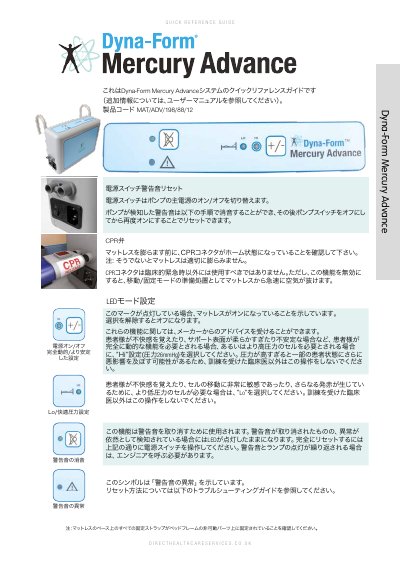
This quick reference guide covers the Dyna-Form Mercury Advance mattress system from Direct Healthcare Services Ltd (product code MAT/ADV/198/88/12). It explains the pump power switch, how to silence a detected alarm and reset it by switching the pump off and on again, checking that the CPR connector is in its home position before inflating the mattress, and what the LED indicators mean. It also describes choosing the fully dynamic/stable setting and the Lo (comfort) or Hi pressure setting, including the 26 mmHg pressure of the Hi setting, and notes that only trained clinicians should change these settings.
The back page is a troubleshooting table listing low pressure and high pressure symptoms with their likely causes and checks, such as a too-soft mode setting, a CPR connector that is not fully home, twisted tubes inside the mattress, or a possible leak. It closes with a description of the company's service solutions and the manufacturer's contact details and ISO 9001 / ISO 13485 manufacturing standards. This manual is written in Japanese.
| Product Code | MAT/ADV/198/88/12 |
|---|---|
| Hi Setting Pressure | 26 mmHg |
| Manufacturing Standards | ISO 9001, ISO 13485 |
| Manufacturer Address | Unit 6/10 Withey Court, Western Industrial Estate, Lon-y-Llyn, Caerphilly, CF83 1BF, UK |
| Sales Office Telephone | +44 (0) 845 459 9831 |
The Hi setting provides a pressure of 26 mmHg. Only trained clinicians should select it.
Make sure the CPR connector is in its home position before inflating the mattress, otherwise it will not inflate properly.
Change the mode button to a higher pressure setting (from Lo toward Hi); if it is still too soft after 5 to 10 minutes, contact an engineer.