
Instructions for loading, checking and removing Dremel EZ Lock accessories on a rotary tool, with safety warnings and a 35,000 RPM limit.
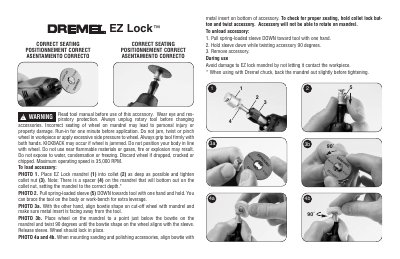
This Dremel instruction sheet shows the correct seating of EZ Lock accessories on a rotary tool mandrel. It is printed in English, French and Spanish and covers the safety warnings, loading and unloading steps, and how to check that the accessory is locked in place.
To load an accessory, place the EZ Lock mandrel into the collet as deep as possible and tighten the collet nut; a spacer on the mandrel bottoms out on the collet nut to set the correct depth. Pull the spring-loaded sleeve down toward the tool, align the bowtie shape on the cut-off wheel with the mandrel with the metal insert facing away from the tool, then twist 90 degrees and release the sleeve. To unload, pull the sleeve down, twist the accessory 90 degrees and remove it.
| Maximum operating speed | 35,000 RPM |
|---|---|
| Mandrel depth setting | Spacer on the mandrel bottoms out on the collet nut |
The maximum operating speed is 35,000 RPM.
Hold the collet lock button and twist the accessory; it will not be able to rotate on the mandrel when properly seated.
Pull the spring-loaded sleeve down toward the tool with one hand, hold it down while twisting the accessory 90 degrees, then remove the accessory.
Read the tool manual first, wear eye and respiratory protection, unplug the rotary tool and run the accessory in for one minute before application.