
Guideline laser settings for various substrates to help users get started with the Dremel DigiLab Laser for woodworking, home décor, and hobbies and crafts.
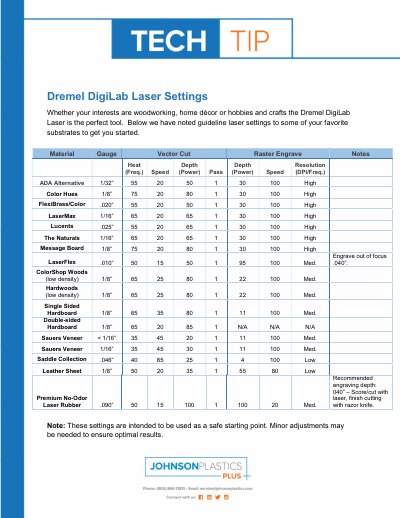
This document provides guideline laser settings for common materials such as woods, plastics, and leather to help users get started with the Dremel DigiLab Laser. Settings are given for vector cutting, raster engraving, and include parameters like speed, power, and resolution. The document notes that these are starting points and may require adjustment for optimal results.
| Material | ADA Alternative |
|---|---|
| Material | LaserMax |
| Recommended Engraving Depth | 040” – Score/cut with laser, finish cutting with razor knife. |
For leather sheet, the settings are: Speed 20, Power 35, Depth 1, Resolution 55, and Power 80.
The recommended engraving depth is 040” – Score/cut with laser, finish cutting with razor knife.