
Operation manual for Dimmer LDR-075 constant voltage LED dimming module, covering wiring, remote pairing, unpairing, brightness setup, and dimming operation.
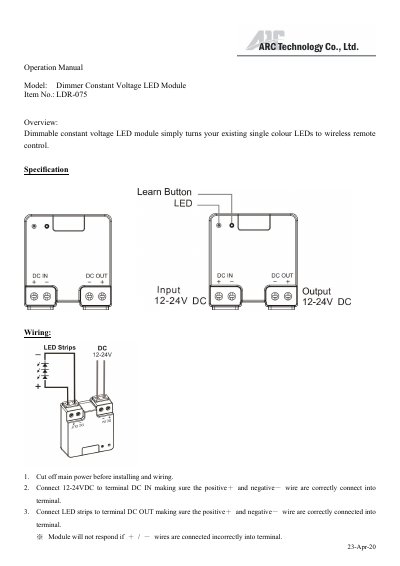
The Dimmer LDR-075 is a dimmable constant voltage LED module that turns existing single-color LEDs into LEDs controlled by a wireless remote. It connects 12-24VDC to DC IN and LED strips to DC OUT; the positive and negative wires must be connected correctly.
This operation manual covers pairing with compatible Self Learning System remote controls, unpairing a single remote, clearing memory, and setting the lowest brightness level. It also describes soft start ON/OFF, dimming operation, cautions, and the listed RF and electrical ratings.
| RF frequency | 433.92 MHz |
|---|---|
| Input rating | 12-24VDC |
| Output rating | ≦75W (12 -24VDC) |
| Maximum paired remote controls | 6 remote controls |
Press the Learn button once on the module, then press the intended remote ON button. The LED strips flash twice when the remote is paired.
Use Self Learning System remote controls only; Code Switch System remote controls are not to control this receiver.
The module can pair with up to 6 different remote controls at one time.
Press the Learn button for 6 seconds, release it, then press it once again. The LED strips flash twice to confirm all remotes are unpaired.