
This troubleshooting guide provides step‑by‑step diagnostics for RVDH series air systems, covering LEDs, fan, temperature, and electrical components.
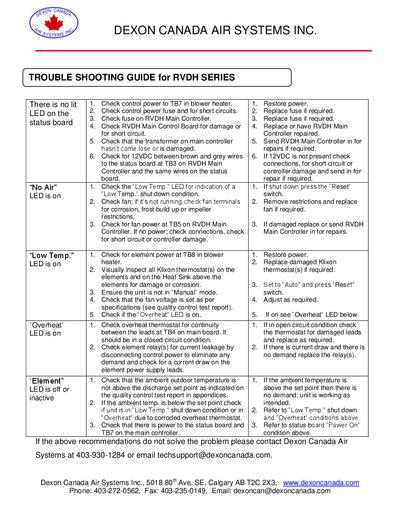
The guide walks technicians through common fault conditions for the RVDH series air systems, such as "No Air", "Low Temp.", "Overheat" and LED indications. It details how to verify power, check fuses, inspect thermostats, and test controller pins using a multimeter.
It also explains the operation of the main controller, airflow sensor board, and manual/auto toggle functions, and provides contact information for technical support and repair services.
| Controller output voltage | 12VDC |
|---|---|
| Fuse rating | 750 mA AGC |
| Fan voltage control | Variable via Fan Adjustment Pot |
| Main power requirement | 120 VAC |
| Low‑temp bypass timer | 7‑8 minutes |
Check the fan for operation, inspect fan terminals for corrosion, frost buildup or impeller restrictions, and verify fan power at TB5 on the main controller.
Press the “Reset” switch to start the built‑in 7‑8 minute bypass timer that allows heating to warm the sensor above freezing.
It indicates an overheat condition; test the overheat thermostat for continuity at TB4 on the main board and check the heating relays for leakage.
Verify element power at TB8, inspect Klixon thermostats for damage or corrosion, ensure the unit is not in Manual mode, and set the fan voltage according to specifications.