
Key facts
- Manuals
- 1
- Languages
- EN
- Last added
- 2026-09-29
Featured Dexon Canada Air Systems manuals
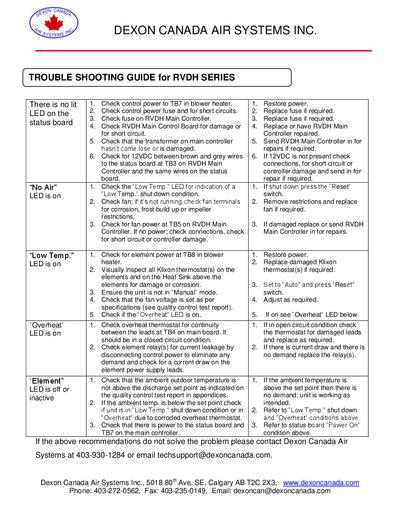
Dexon Canada Air Systems RVDH Series Service Manual – Troubleshooting Guide
The guide walks technicians through common fault conditions for the RVDH series air systems, such as "No Air", "Low Temp.", "Overheat" and LED indications. It details how to verify power, check fuses, inspect thermostats, and test controller pins using a multimeter.
It also explains the operation of the main controller, airflow sensor board, and manual/auto toggle functions, and provides contact information for technical support and repair services.
Covers: Troubleshooting Guide · RVDH Main Control Board · Test Pin Descriptions · Airflow Sensor Board – RVDHAFS · LED Indications · Manual/Auto Toggle Switch
Latest Dexon Canada Air Systems manuals
Dexon Canada Air Systems RVDH Series Service Manual – Troubleshooting Guide
Service Manual 7 pages · 984 KB · ENThis troubleshooting guide provides step‑by‑step diagnostics for RVDH series air systems, covering LEDs, fan, temperature, and electrical components.
Which document do I need?
Service Manual
Disassembly, diagnostics and part numbers, for repair.
Questions answered in Dexon Canada Air Systems manuals
What should I do if the "No Air" LED is on?
Check the fan for operation, inspect fan terminals for corrosion, frost buildup or impeller restrictions, and verify fan power at TB5 on the main controller.
From: Dexon Canada Air Systems RVDH Series Service Manual – Troubleshooting Guide
How can I reset a low‑temperature shutdown?
Press the “Reset” switch to start the built‑in 7‑8 minute bypass timer that allows heating to warm the sensor above freezing.
From: Dexon Canada Air Systems RVDH Series Service Manual – Troubleshooting Guide