
The DETECH DET-306 infrared thermometer quick help guide covers setup, forehead and object temperature measurement, troubleshooting error codes, and battery…
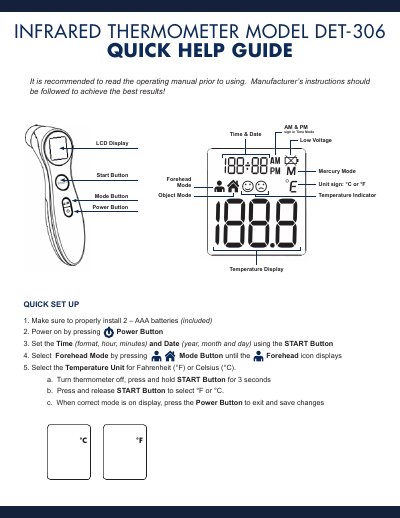
The DETECH DET-306 infrared thermometer measures temperature in forehead or object mode and displays readings in °C or °F. It is powered by two AAA batteries and shows time, date, AM/PM indicators, mode, and low voltage status on its LCD.
The quick help guide covers battery installation, time and date setup, unit selection, and basic forehead temperature taking. It also lists error messages Er 1 through Er 5, Hi and Lo readings, low battery remedies, and helpful hints for keeping the probe window clean.
| Battery | 2 AAA batteries (included) |
|---|---|
| Operating ambient temperature | 50-104 °F (10-40 °C) |
| High temperature threshold | above 109.4 °F (43 °C) |
| Low temperature threshold | below 93.2 °F (34 °C) |
| Measurement distance | approximately 1 inch from forehead |
Turn the thermometer off, press and hold the START Button for 3 seconds, press and release START to select °F or °C, then press the Power Button to exit and save.
It means the thermometer is not ready to take a measurement.
Wipe the probe window 3 times with a clean cotton swab dipped in 70% alcohol, then wait 10 minutes before taking temperatures.
Replace it with 2 new AAA alkaline batteries.