
Key facts
- Manuals
- 1
- Languages
- EN
- Last added
- 2026-11-17
Featured Detech manuals
DETECH DET-306 Infrared Thermometer User Manual
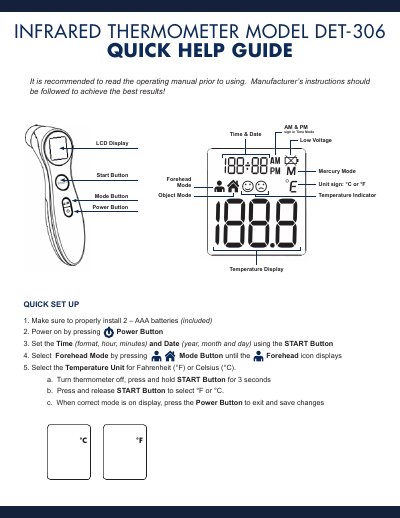
The DETECH DET-306 infrared thermometer measures temperature in forehead or object mode and displays readings in °C or °F. It is powered by two AAA batteries and shows time, date, AM/PM indicators, mode, and low voltage status on its LCD.
The quick help guide covers battery installation, time and date setup, unit selection, and basic forehead temperature taking. It also lists error messages Er 1 through Er 5, Hi and Lo readings, low battery remedies, and helpful hints for keeping the probe window clean.
Covers: LCD Display · Quick Set Up · Basic Temperature Taking (Forehead Mode) · Troubleshooting · Helpful Hints
Latest Detech manuals
DETECH DET-306 Infrared Thermometer User Manual
User Manual 2 pages · 242 KB · ENThe DETECH DET-306 infrared thermometer quick help guide covers setup, forehead and object temperature measurement, troubleshooting error codes, and battery…
Which document do I need?
User Manual
Day-to-day operation, settings and troubleshooting. Start here if the product is already set up.
Questions answered in Detech manuals
How do I switch the temperature unit between °F and °C?
Turn the thermometer off, press and hold the START Button for 3 seconds, press and release START to select °F or °C, then press the Power Button to exit and save.
What does error Er 1 indicate?
It means the thermometer is not ready to take a measurement.