
Quick start guide for Dell OptiPlex 7450 All-in-One, covering power connection, keyboard/mouse setup, cable cover installation, stand mounting, and Windows…
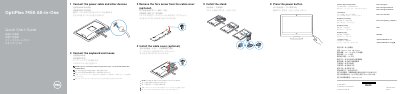
This guide walks you through connecting power, keyboard, and mouse. It also covers optional cable cover installation and stand mounting. After setup, you’ll configure Windows 10 and connect to your network.
The device includes features like a camera, microphone, HDMI ports, USB 3.0, and a service tag. It meets Taiwan’s RoHS standards and includes safety and regulatory information. This manual is written in Chinese.
| Rated Voltage | 100 - 240 volts (AC) |
|---|---|
| Rated Frequency | 50 - 60 Hz |
| Rated Input Current | 3.0 amps |
| Computer Model | OptiPlex 7450 All-in-One |
See the documentation that shipped with the wireless device.
It meets Taiwan’s RoHS standard CNS15663, excluding lead, mercury, cadmium, hexavalent chromium, PBB, and PBDE.