
This guide provides instructions for setting up the Dell Edge Gateway 5000 Series, including inserting a SIM card, connecting peripherals, mounting the…
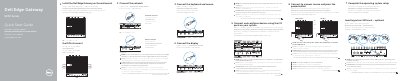
This document serves as a multilingual Quick Start Guide for the Dell Edge Gateway 5000 Series. It outlines the initial setup steps required to get the device operational, such as inserting an optional micro-SIM card, connecting a wireless antenna, keyboard, and mouse, and attaching the display. The guide also covers physical installation methods, including wall mounting and DIN rail mounting.
| Power Adapter Port | +24V AC/DC or +19 VDC |
|---|---|
| Video Port | HDMI |
| Network Ports | Network port |
Yes, it is recommended to insert the micro-SIM card before powering on the Dell Edge Gateway.
No, these peripherals are sold separately.
Yes, you can connect the power cable to the +24V AC/DC or +19 VDC power adapter port.
You must turn on the corresponding dip switches to enable the corresponding RS232/RS422/RS485 ports.