
Quick installation guide for the CVW506 device, covering setup, software installation, connection settings, and fax usage.
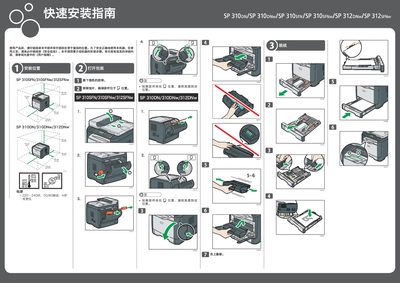
This guide provides step‑by‑step instructions for installing the CVW506 machine. It includes placement of the device, power connection, and initial setup procedures before use.
The document also explains how to install the accompanying software via USB or network, configure telephone and fax connections, select the appropriate line type, and perform basic fax operations such as loading documents, entering numbers, and sending faxes. This manual is written in Chinese.
| Power Input | 220‑240 V, 50/60 Hz, ≤4 A |
|---|---|
| Dimensions (example model) | 70 cm × 20 cm × 40 cm |
Click the USB Quick Install or Network Quick Install button, then follow the on‑screen prompts; for USB install, connect the USB cable to the computer after the process completes.