
This manual provides instructions for the COUGAR PURI MINI Compact 60% DSA Mechanical Gaming Keyboard, covering macro recording, lighting customization, and…
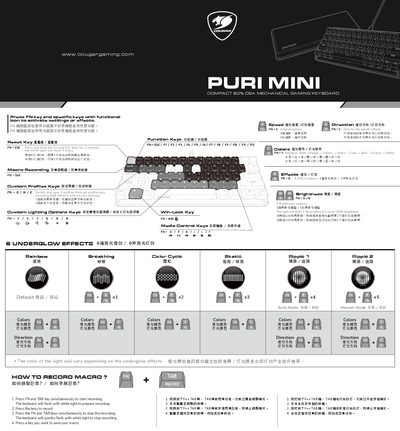
This document serves as the user manual for the COUGAR PURI MINI Compact 60% DSA Mechanical Gaming Keyboard. It details the keyboard's features, including its mechanical switches, RGB lighting effects, and macro recording capabilities. The guide explains how to use function keys for custom profiles and media control. This manual is written in Chinese.
| Switch Type | Mechanical |
|---|---|
| Keycaps | PBT Doubleshot Ball Shape |
| Interfaces | USB plug / USB Type-C |
| Dimensions | 295 x 121 x 38.4 (mm) |
| Profiles | 3 Profiles (Lighting & Macro) |
| Lighting Effects | 6 Underglow effects |
Press and hold the FN and TAB keys simultaneously to start recording, press the keys you want to record, then press FN and TAB again to stop.
The keyboard supports Windows 10, Windows 11, and Mac OS.