
The COUGAR MHP120 ARGB Fan User Manual provides specifications, installation steps, and usage guidelines for the 2000 RPM ARGB fan.
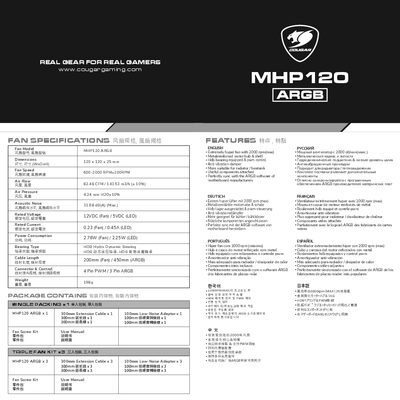
The MHP120 ARGB fan features a metal‑reinforced motor hub, hydro‑dynamic bearing, PWM control, and anti‑vibration pads. It delivers up to 2000 RPM, 82 CFM airflow and syncs with motherboard ARGB software.
This manual includes detailed specifications, a parts list, installation instructions, safety cautions, and guidance on using the optional low‑noise adapter. Follow the wiring diagrams and cautions to ensure proper operation and avoid damage.
| Fan Model | MHP120 ARGB |
|---|---|
| Dimensions (W×D×H) | 120 mm × 120 mm × 25 mm |
| Speed | 600‑2000 RPM ±200 RPM |
| Air Flow | 82.48 CFM / 143.53 m³/h (±10%) |
| Air Pressure | 4.24 mm H₂O ±10% |
| Noise Level | 31.68 dB(A) Max |
| Voltage (Fan / LED) | 12 VDC / 5 VDC |
| Current (Fan / LED) | 0.23 A / 0.45 A |
| Power Consumption (Fan / LED) | 2.76 W / 2.25 W |
| Bearing Type | HDB Hydro Dynamic Bearing |
| Connector | 4‑Pin PWM / 3‑Pin ARGB |
The Low‑Noise adapter reduces the fan speed from 2000 RPM to about 1500 RPM for quieter operation; monitor CPU temperature when using it.
No – the manual warns not to connect the fan to a 4‑pin 12 V header.