
User manual for Brother MFC-3320CN multifunction printer, covering supported OS, software, interfaces, and system requirements.
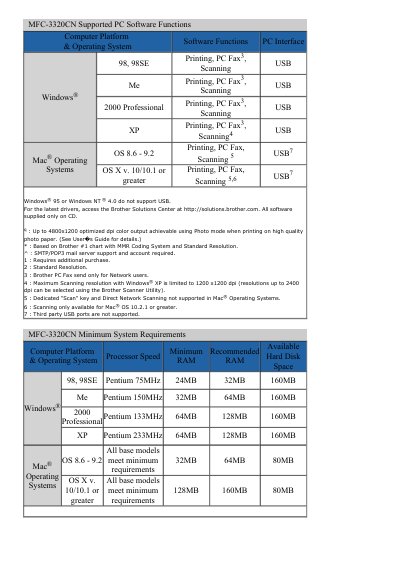
This document details the supported computer platforms and operating systems for the Brother MFC-3320CN multifunction printer, including Windows 98, 98SE, Me, 2000 Professional, and XP, as well as Mac OS 8.6–9.2 and OS X v.10/10.1 or greater. It specifies required processor speeds, RAM, and hard disk space for each system. The printer supports USB interfaces and offers features like printing, faxing, and scanning. For Windows XP, scanning resolution is limited to 1200x1200 dpi unless using the Brother Scanner Utility. Mac OS X 10.2.1 or greater is required for scanning. Third-party USB ports are not supported. This manual is written in Chinese.
| Processor Speed (Windows XP) | Pentium 233MHz |
|---|---|
| Minimum RAM (Windows XP) | 64MB |
| Scanning Resolution (Windows XP) | 1200 x 1200 dpi (up to 2400 dpi with Brother Scanner Utility) |
| USB Compatibility | Supported on Windows and Mac OS, but third-party USB ports not supported |
The minimum RAM required for Windows XP is 64MB.
The maximum scanning resolution on Windows XP is 1200 x 1200 dpi, but up to 2400 dpi is possible using the Brother Scanner Utility.
Yes, USB is supported on Mac OS, but third-party USB ports are not supported.