
Chinese user manual for the Biopac MP150 16‑channel physiological recorder covering installation, operation, and data analysis.
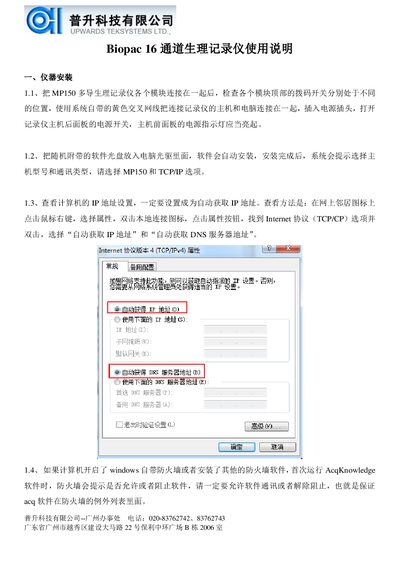
The manual explains how to install the MP150 hardware, connect it to a PC via Ethernet, and configure the system software AcqKnowledge. It includes detailed steps for setting IP addresses, firewall exceptions, and module connections.
It also describes software functions such as channel setup, data acquisition, transformation, analysis, and exporting results. Calibration procedures for various physiological signals and troubleshooting tips are provided throughout the document. This manual is written in Chinese.
| Number of channels | 16 |
|---|---|
| Supported signal types | ECG, EEG, EGG, EMG, EOG, ERS |
| Notch filter frequency | 50 Hz |
| Communication interface | TCP/IP |
Set the PC to obtain an IP address automatically (DHCP) via the network connection properties.
Allow the AcqKnowledge software through the Windows firewall or any third‑party firewall so it can communicate with the recorder.