
User manual for the Bellman & Symfon Vibio BE1221 bed shaker vibrating alarm, covering setup, LED indicators, app alarm management, specs and troubleshooting.
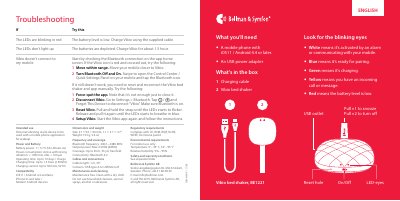
This is the English user manual for the Vibio bed shaker (BE1221), a personal vibrating alarm device that is used together with a mobile phone app for wakeup. It lists what you need and what is in the box, explains the parts of the device and what each LED eye color means, and describes how to install Vibio: power it up, slide the On/Off switch, and install the Vibio app from the App Store or Google Play.
The manual also explains the app's alarm management and monitoring screens, gives troubleshooting steps for red blinking LEDs, dead LEDs and Bluetooth connection problems, and ends with the product's power, battery, compatibility, dimensions, Bluetooth, maintenance and environmental specifications, plus the manufacturer's contact details.
| Battery power | 3.7 V AA Lithium-ion |
|---|---|
| Power consumption | Active with strong vibration: < 1000 mA, Idle: < 100 μA |
| Operating time | Up to 10 days per charge |
| Charging time | Up to 1.5 hour at 500 mA |
| Charging current | Up to 500 mA, 5V DC |
| Compatibility | iOS11 / Android 4.4 and later, iPhone 5s and later / modern Android devices |
| Size | 27 x 94 x 94 mm, 1.1 x 3.7 x 3.7 in |
| Weight | 153 g, 5.4 oz |
| Bluetooth frequency | 2402 – 2480 MHz |
| Output power | Max 2.5 mW (4 dBm) |
| Coverage | Up to 30 m / 33 yd in free field |
| Connectivity | Bluetooth 4.2 |
| Cable length | 1 m, 39 in, USB type A to USB Micro-B |
| Operating temperature | 0°–35° C, 32°–95° F, indoor use only |
| Relative humidity | 5% – 95% |
| Regulatory compliance | CE, RCM, BQB, RoHS, WEEE, Der Grüne punkt |
It works with iOS11 or Android 4.4 and later, including iPhone 5s and later and modern Android devices.
White means it is activated by an alarm or communicating with your mobile, blue means it is ready for pairing, green means it is charging, yellow means an incoming call or message, and red means the battery level is low.
The batteries are depleted; charge Vibio for about 1.5 hour with the supplied cable.
Force-quit the app, forget the Vibio device in Settings > Bluetooth, then pull and hold the strap until the LEDs flicker and pull again until they breathe in blue, and set Vibio up again in the app.
It is maintenance free; clean it with a dry cloth and do not use household cleaners, aerosol sprays, alcohol or abrasives.