
This manual explains how to use the demo program for the Youwo Technology YW-630/YW-631 Modbus readers, covering port setup, register read/write, and…
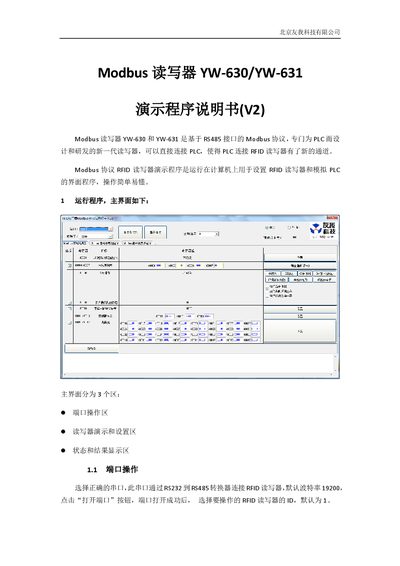
The document provides step‑by‑step instructions for operating the demonstration program that simulates a PLC interacting with RFID readers via the YW‑630/YW‑631 Modbus readers. It describes the three main interface areas – port operation, reader demo and settings, and status/result display – and shows how to open the serial port, select the reader ID, and perform basic read/write actions.
Further sections detail the configuration registers, including baud‑rate and station ID settings, card‑parameter registers, key registers, block data handling, and advanced options such as skipping key blocks, sleep mode, and data endian mode. The manual also lists the default register values and explains how to write to LED/buzzer controls and manage block data. This manual is written in Chinese.
| Interface | RS485 |
|---|---|
| Default Baud Rate | 19200 |
| Default Modbus Station ID | 1 |
| Register 40001 | Baud rate and ID (0x0301) |
| Register 40002 | Card parameters (0x0030) |
| Maximum Block Data Size | 64 bytes |
| Maximum Number of Blocks | 4 blocks |
| Authentication Mode | A key |
| LED/Buzzer Control Register | Register 40003 (0x0000) |
| Block Data per Block | 16 bytes |
Select the correct serial port, then click the “打开端口” button; the port will open successfully.
Select the desired register and click the “自动读” button; the register value will be automatically read and refreshed.
Choose the LED/buzzer parameter, then click the “写入” button; if successful, the RFID reader will respond immediately.
The reader can handle up to four blocks, each containing 16 bytes of data.