
Bang & Olufsen Beoplay 500 Headphones Quick Start Guide

Bang & Olufsen Beoplay 500 quick start guide covering dongle setup, app pairing, USB-C charging, ANC, transparency, and call controls.
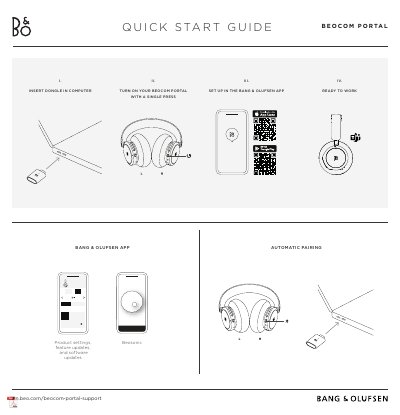

Bang & Olufsen Beoplay 500 Headphones Quick Start Guide - cover page
Brand
Bang & Olufsen
Category
Headsets
Document type
Quick Start Guide
Language
English
Pages
2
File format
PDF
File size
650 KB
Published
23 November, 2026
Updated
23 November, 2026
MD5 checksum
E18031FD6CFDC28DDAB1A98BD1C68AB9

About this manual

This quick start guide is for the Bang & Olufsen Beoplay 500. It describes inserting the dongle into a computer, turning the device on, and setting it up in the Bang & Olufsen app.

Daily use sections cover USB-C charging and wired connection, line-in, Bluetooth pairing, volume and ANC/transparency controls, call handling, and Teams dedicated functionalities.

What's inside

  • Insert Dongle in Computer with a Single Press
  • Turn On Your Beocom Portal
  • Set Up in the Bang & Olufsen App
  • Ready to Work
  • Product Settings, Feature Updates, and Software Updates
  • Daily Use
  • USB-C Charging and Wired Connection
  • Active Noise Cancellation / Transparency or Own Voice
  • Teams Dedicated Functionalities

Specifications

ModelBeoplay 500
ChargingUSB-C
Active Noise CancellationSupported
Teams SupportDedicated functionalities

Frequently asked questions

How do I pair the Beoplay 500?

Long press for a blinking blue light to pair, or single press to search and cancel pairing.

How do I turn the device on or off?

Use a short press to turn the device on or off.

How is the device charged?

It charges through USB-C charging and wired connection.

Download PDF (650 KB)

More Bang & Olufsen Manuals


View all Bang & Olufsen manuals →