
User manual for Aquauno Video 2 and Video 2 Plus water timers covering installation, battery setup, time setting, programming, and rain sensor connection.
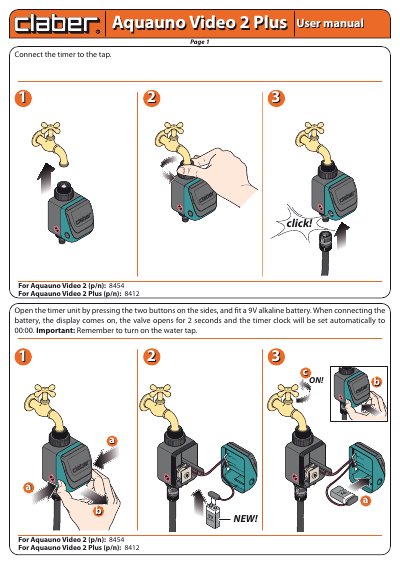
The Aquauno Video 2 and Video 2 Plus are battery-powered water timers that connect to a tap for automated irrigation. The manual describes how to install the 9V alkaline battery, set the current time, and configure up to two independent watering programs with weekly scheduling.
Additional features include a manual watering function that runs for up to 15 minutes, a rain sensor connection to suspend watering during rainfall, and winter storage instructions. The timer automatically opens the valve for two seconds when the battery is connected and sets the clock to 00:00.
| Battery | 9V alkaline |
|---|---|
| Valve opening on battery connection | opens for 2 seconds |
| Clock initialization | automatically set to 00:00 |
| Manual watering auto-close | closes automatically after 15 minutes |
| Rain sensor connection | socket provided, protective jumper must be removed |
Open the timer unit by pressing the two side buttons, insert a 9V alkaline battery, and the display will turn on while the valve opens for two seconds and the clock sets to 00:00.
Press ENTER, then use the FORWARD or BACK buttons to adjust the time; hold them to scroll quickly, then press ENTER again to confirm.
Plug the rain sensor into the provided socket and remove the protective jumper.