
Key facts
- Manuals
- 1
- Languages
- EN
- Last added
- 2026-11-12
Featured Aquauno manuals
Aquauno Logica Plus Timer User Manual
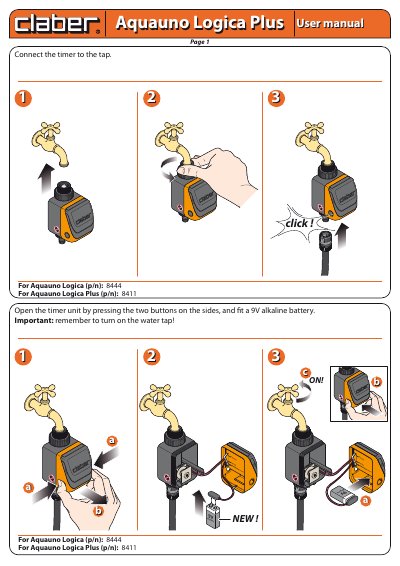
The Aquauno Logica Plus is a programmable timer designed to control water taps. To operate the device, connect it to the tap and insert a 9V alkaline battery. The user can select from 15 preset watering cycles by turning the dial, with each program starting automatically after a 10-second delay. A LED indicator blinks during operation, and the program can be changed at any time by resetting the dial to '0' and selecting a new setting.
Covers: Installation · Battery Replacement · Program Selection · Rain Sensor Connection · Storage Instructions
Latest Aquauno manuals
Aquauno Logica Plus Timer User Manual
User Manual 3 pages · 1.4 MB · ENThis manual provides instructions for installing, operating, and maintaining the Aquauno Logica Plus programmable timer, including battery replacement and…
Which document do I need?
User Manual
Day-to-day operation, settings and troubleshooting. Start here if the product is already set up.
Questions answered in Aquauno manuals
How do I change the watering program?
Turn the knob to '0' to cancel the current program, then position it on another number to select a new one.
What happens if I connect a rain sensor?
The protective jumper must be removed from the socket provided for the rain sensor connection.