
Anchor quick manual guide for the 12/5/3/2 MP IR Bullet Network IP Camera: package contents, parts, wall mounting, network deployment, browser access and RTSP.
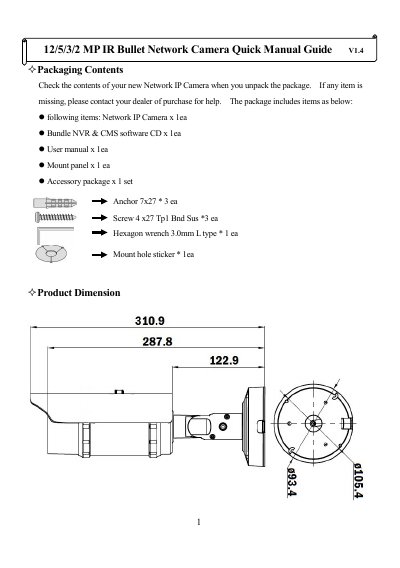
This is the Anchor Quick Manual Guide (V1.4) for the 12/5/3/2 MP IR Bullet Network IP Camera. It starts with a packaging contents check, then describes the camera parts — sunshield cover, IR LEDs, illumination sensor, video out, Micro SD card slot, reset button and mount panel — and the cables, including audio in/out, the waterproof RJ-45 connector, alarm inputs and output, reset and the DC12V power cable.
The guide then covers wall mount installation with the mount hole sticker and hexagon wrench, camera angle adjustment and lens focus/zoom adjustment, network deployment with and without PoE, finding and accessing the camera from IE, Chrome, Safari or Firefox, installing the plugin, viewing streams with RTSP players such as QuickTime, Real Player and VLC, and installing the bundled NVR software and setting camera parameters with ezSetup.
| Power input | DC12V power adapter (when no PoE hub is used) |
|---|---|
| Weatherproof rating | IP66 (camera body; cable jack is not waterproof) |
| Storage card slot | Micro SD card up to 128 G or higher (optional) |
| Power over Ethernet | PoE-compliant, power and data over one Ethernet cable |
| Default IP address | 192.168.0.123 |
| Default user name / password | admin / 123456 |
| NVR software capacity | 32/64 channels of IP cameras |
The default IP address is 192.168.0.123 and the default user name / password is admin / 123456.
Press the reset button for 20 seconds and the camera parameters return to default.
Use RTSP://User name:Password@IP Address:RTSP Port/ch01.264, for example rtsp://admin:[email protected]:554/ch01.264.
Players that support RTSP streaming, such as QuickTime Player, Real Player or VLC media player.