
This manual explains how to use the Agricultural Bank of China K-Bao Bluetooth version for mobile and online banking, including installation, certificate…
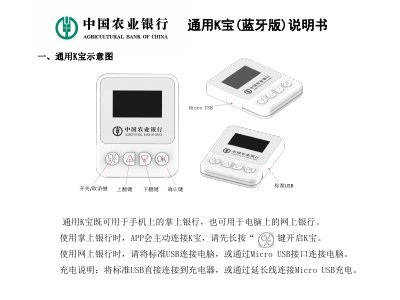
This manual provides instructions for using the Agricultural Bank of China K-Bao Bluetooth version. It covers operation on both mobile phones and computers, including downloading the mobile banking app and installing the management tool on a PC. The guide details steps for downloading certificates, performing transfers, and modifying passwords. This manual is written in Chinese.
Press and hold the button to turn on the K-Bao before the mobile app connects to it.
Connect the device to the computer using a standard USB connection or the Micro USB interface.
Check the transaction information displayed on the device; if correct, press the 'OK' key to complete the transaction.
If the transaction information is incorrect, press the button to cancel the transaction.