
Key facts
- Manuals
- 1
- Languages
- ZH
- Last added
- 2026-10-22
Featured Agricultural Bank of China manuals
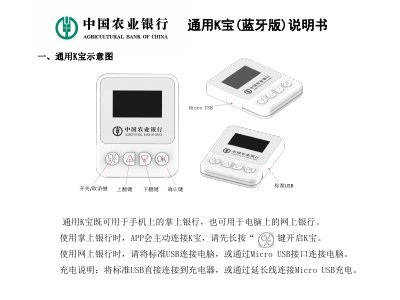
Agricultural Bank of China K-Bao Bluetooth Version User Manual
This manual provides instructions for using the Agricultural Bank of China K-Bao Bluetooth version. It covers operation on both mobile phones and computers, including downloading the mobile banking app and installing the management tool on a PC. The guide details steps for downloading certificates, performing transfers, and modifying passwords. This manual is written in Chinese.
Covers: General K-Bao Schematic · Mobile Phone Usage · Mobile Banking App Installation · Certificate Download · Transfer Operations · Password Modification
Latest Agricultural Bank of China manuals
Agricultural Bank of China K-Bao Bluetooth Version User Manual
User Manual 8 pages · 619 KB · ZHThis manual explains how to use the Agricultural Bank of China K-Bao Bluetooth version for mobile and online banking, including installation, certificate…
Which document do I need?
User Manual
Day-to-day operation, settings and troubleshooting. Start here if the product is already set up.
Questions answered in Agricultural Bank of China manuals
How do I activate the K-Bao Bluetooth version for mobile banking?
Press and hold the button to turn on the K-Bao before the mobile app connects to it.
From: Agricultural Bank of China K-Bao Bluetooth Version User Manual
How do I connect the K-Bao Bluetooth version to a computer?
Connect the device to the computer using a standard USB connection or the Micro USB interface.
From: Agricultural Bank of China K-Bao Bluetooth Version User Manual