
AEM X-WIFI EGT connection guide for installing and connecting the EGT thermocouple.
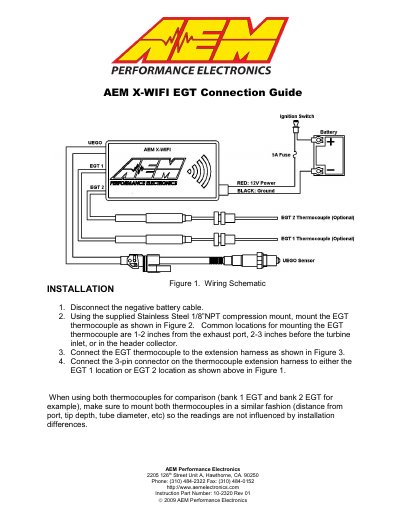
This is the AEM X-WIFI EGT Connection Guide. It gives installation steps for the EGT thermocouple, including disconnecting the negative battery cable, mounting the thermocouple, connecting the extension harness, and connecting the 3-pin connector. It also describes the heat shrink connection and includes notes.
Connect the EGT thermocouple to the extension harness, then connect the 3-pin connector to the EGT 1 or EGT 2 location.
Mount it with the supplied Stainless Steel 1/8 NPT compression mount, with common locations 1-2 inches from the exhaust port, 2-3 inches before the turbine inlet, or in the header collector.
Slide the supplied heat shrink onto the sensor cable, connect the RED and YELLOW wires with the supplied 4-40 screws and hex nuts, center the heat shrink, and apply mild heat to shrink it over the connections.