
Installation instructions for the AD909A adapter card, including parts list, mounting steps, and SATA power‑saving configuration.
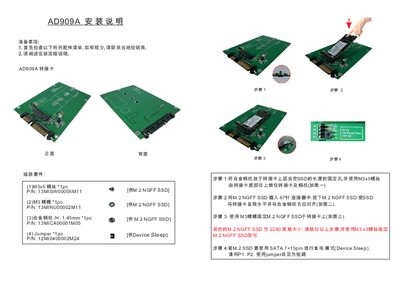
This guide provides a complete parts list and step‑by‑step instructions for installing the AD909A adapter card with an M.2 NGFF SSD. It covers preparing the components, mounting the alloy copper post, inserting the SSD, and securing it with screws or nuts.
The document also explains how to enable the SATA 7+15‑pin Device Sleep power‑saving mode by setting the appropriate jumper pins. Special handling for 2280‑size SSDs is included, allowing a simplified installation using only an M3 × 3 mm screw. This manual is written in Chinese.
| Screw size for mounting | M3 × 5 mm |
|---|---|
| Nut size | M3 |
| Alloy copper post height | 1.45 mm |
| Jumper part number | 12MI0400002M24 |
| SATA power‑saving mode | Device Sleep (SATA 7+15pin) |
Set jumper pins P1 and P2 to short (bridge) as shown in the guide.
Yes, for a 2280 SSD you can skip the copper‑post steps and secure it directly with an M3 × 3 mm screw.