
User guide for Acura RDX's uAudio remote control and audio system features including volume, power, mode selection, and sound settings.
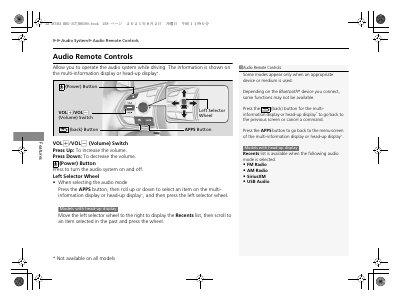
This manual explains how to use the uAudio remote controls to operate the audio system while driving. It covers volume adjustment, power on/off, mode selection, and the Recents list. The system can be controlled via the multi-information display or head-up display. Sound settings can be customized for different speaker zones, bass/treble, and speed volume compensation. Some features like Apple CarPlay or Android Auto are available depending on the model and connected devices. This manual is written in Japanese.
Press Up to increase volume or Down to decrease volume.
Press the (Power) Button to turn the audio system on and off.
Available modes include FM Radio, AM Radio, SiriusXM, USB Audio, and Bluetooth Audio.
The SVC adjusts the volume level based on the vehicle speed — volume increases as speed increases and decreases as speed decreases.