
This manual introduces the functions of the controller, working modes, auxiliary input terminal function settings, pre-flashing, automatic closing, automatic eye testing, starting encoder, soft start, braking function, locking the door leaf, and closing direction settings.
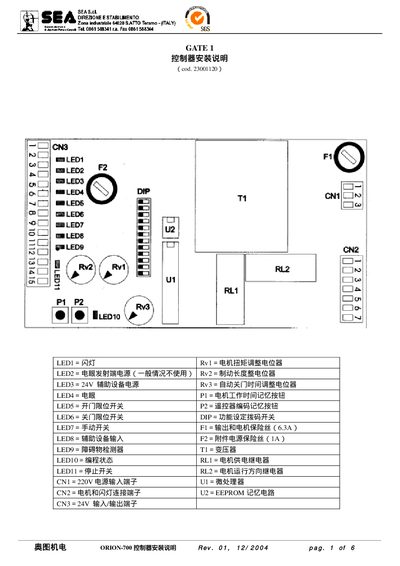
This Chinese installation guide describes the ORION-700 controller's front-panel LEDs, potentiometers, DIP switches, connectors, fuses, and transformer. It also explains operating modes, auxiliary input terminal functions, feature settings, potentiometer adjustments, automatic motor run-time setup for sliding and swing gate motors, and remote control coding. This manual is written in Chinese.
| Power input terminal | CN1, 220V |
|---|---|
| Output and motor fuse | F1, 6.3A |
| Accessory power fuse | F2, 1A |
| Automatic closing time range | 0 to 120 seconds |
It activates automatic closing; after the door opens, it closes after the time preset by Rv3.
They can be set as a safety edge input, timer input, auxiliary photo eye input, or half-open manual switch input.
Press and hold P2 until LED10 lights, then press and hold a remote button; LED10 flashes to show it is stored and relights for the next button, exiting after 10 seconds without a signal.
They must be short-circuited with wire.