
DMT-20 Stereo Digital Microphone Decoder Test Box is a professional CODEC decoder digital microphone, outputs stereo audio analog signal to microphone measurement and analysis equipment. No need to update the original measurement software or equipment, reduce testing costs.
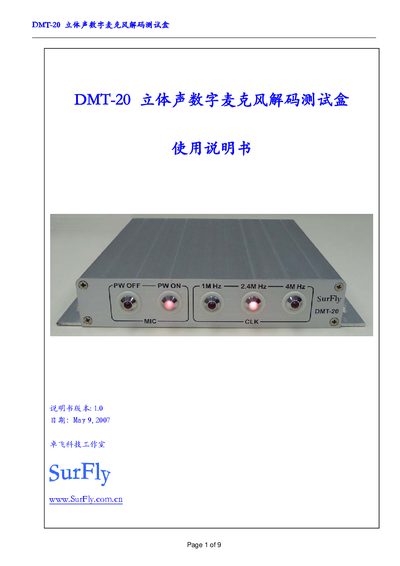
The DMT-20 is a stereo digital microphone decoding test box that converts digital microphone signals to analog stereo audio for measurement equipment. It features touch controls, LED status indicators, selectable clock frequencies (1 MHz, 2.4 MHz, 4 MHz), and COM‑1 interface for PC control.
The manual covers version history, hardware installation, front and rear panel descriptions, microphone wiring, test procedures, COM communication commands, technical specifications, and warranty information. This manual is written in Chinese.
| Power Supply | 15 V DC |
|---|---|
| Microphone Power | 3.3 V |
| Microphone Interface | Dual 4‑pin digital mic connector (MIC172) |
| Analog Audio Output | 3.5 mm stereo jack (ST‑OUT) |
| Coaxial Audio Output | L/R coaxial connector (L7R‑OUT) |
| PC Interface | COM‑1 (RS‑232) for software control |
| Clock Frequencies | 1 MHz, 2.4 MHz, 4 MHz (selectable) |
| Maximum Cable Length – Single Mic | < 1 m shielded cable |
| Maximum Cable Length – Dual Mic | < 0.5 m shielded cable |
| Output Level (no mic) | < -90 dBV |
| Output Level (with mic) | < -60 dBV |
Use the touch controls: PWON to turn power on and PWOFF to turn power off.
Select the desired frequency (1 MHz, 2.4 MHz, or 4 MHz) using the touch control.
0x65 closes mic power, 0x66 opens mic power, 0x67 selects 1 MHz, 0x68 selects 2.4 MHz, 0x69 selects 4 MHz.
For a single microphone keep the cable under 1 m; for dual microphones keep each cable under 0.5 m.