
HT48 & HT46 Keyboard Scan Program is a keyboard scan program that can scan a 4×4 keyboard array and display key values.
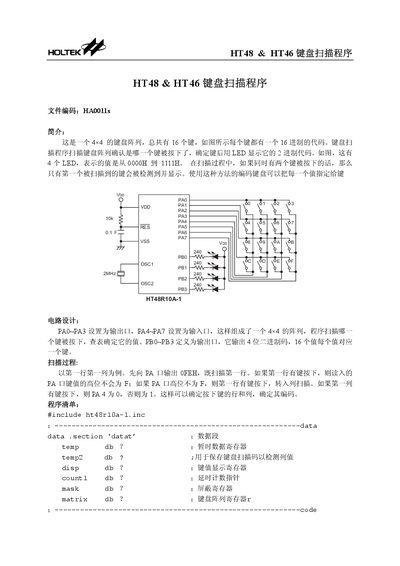
The document describes a 4×4 keyboard matrix with 16 keys and four LEDs that display the pressed key's binary code. It details the hardware configuration, assigning PA0‑PA3 as outputs, PA4‑PA7 as inputs, and PB0‑PB3 as the LED output ports.
The program code scans each row, detects pressed keys, reads column data, and converts the position into a 4‑bit binary value shown on the LEDs. Subroutines for key reading and delay handling are provided, along with explanations of each code section. This manual is written in Chinese.
| Keyboard matrix size | 4×4 |
|---|---|
| Number of keys | 16 |
| Number of LEDs | 4 |
| PA output pins | PA0~PA3 |
| PA input pins | PA4~PA7 |
| PB output pins | PB0~PB3 |
The keyboard matrix contains 16 keys.
It shows the 4‑bit binary code of the pressed key on four LEDs.
Only the first key detected by the scan is processed and displayed.