
User manual for the 酷比魔方 series digital media player covering operation, settings, USB connection, firmware upgrade and specifications.
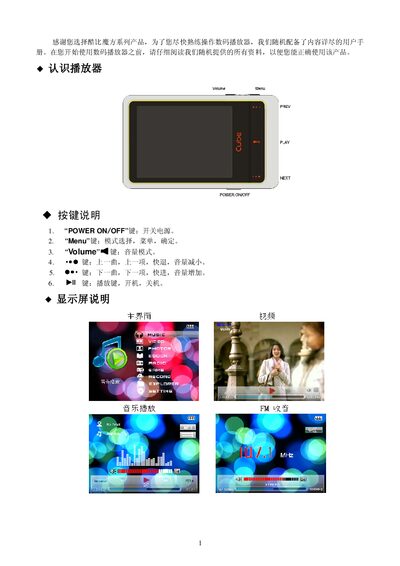
This manual introduces the 酷比魔方 series digital media player, describing the physical buttons, display, and basic operation such as power on/off, volume control, and playback functions. It also explains how to navigate the system menus for music, video, pictures, e‑books, FM radio, games, recording and file management.
Additional sections cover USB connection for file transfer, battery charging, firmware upgrade procedures, troubleshooting tips, technical specifications, environmental compliance information and warranty details. This manual is written in Chinese.
| Display size | 2.4 inch TFT |
|---|---|
| Resolution | 320 × 240 |
| USB interface | High‑speed USB 2.0 |
| Memory | 1 GB – 8 GB flash storage |
| Battery | 3.7 V / 500 mAh polymer |
| Video playback time | 3.5 h (headphone volume 24) |
| Audio playback time | 6 h (screen saver, headphone volume 24) |
| Sample rate | 8 kHz / 16 kHz |
| Recording format | WAV (32 kbps / 64 kbps) |
| Maximum recording time | 64 h (1 GB capacity) |
| Headphone output | L 10 mW / R 10 mW (32 Ω) |
| MP3 bitrate | 64 kbps – 320 kbps |
| WMA bitrate | 64 kbps – 384 kbps |
| Frequency response | 20 Hz – 20 kHz |
| Signal‑to‑noise ratio | > 85 dB |
| Audio distortion | 0.03 % |
| Operating temperature | -5 °C to 40 °C |
| Supported languages | 18 languages (e.g., Chinese, English, German, Japanese, French, Russian) |
Press the “POWER ON /OFF” key to the ON position and hold it for more than 3 seconds to power on; move the key to OFF to power off instantly.
Connect the player to the computer with the supplied USB cable; the device will appear as a removable disk, allowing you to copy music, video or other files directly.
Check that the battery has charge and that the USB cable is properly connected; if the device still does not power up, contact the local dealer for assistance.