
Key facts
- Manuals
- 1
- Languages
- ZH
- Last added
- 2026-09-28
Featured 酷比魔方 manuals
酷比魔方 Series Digital Media Player User Manual
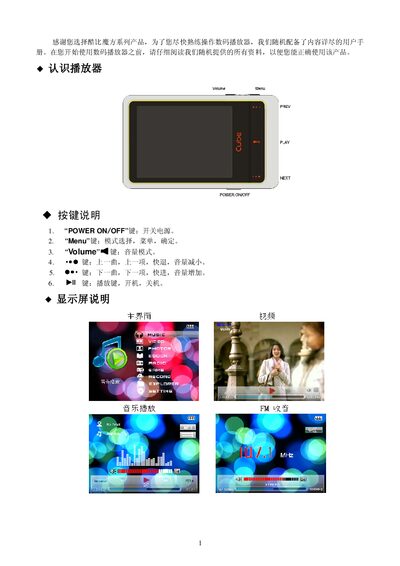
This manual introduces the 酷比魔方 series digital media player, describing the physical buttons, display, and basic operation such as power on/off, volume control, and playback functions. It also explains how to navigate the system menus for music, video, pictures, e‑books, FM radio, games, recording and file management.
Additional sections cover USB connection for file transfer, battery charging, firmware upgrade procedures, troubleshooting tips, technical specifications, environmental compliance information and warranty details. This manual is written in Chinese.
Covers: Button Layout · Display Description · Basic Operation · System Menu · Music Playback · Video Playback
Latest 酷比魔方 manuals
酷比魔方 Series Digital Media Player User Manual
User Manual 8 pages · 1.1 MB · ZHUser manual for the 酷比魔方 series digital media player covering operation, settings, USB connection, firmware upgrade and specifications.
Which document do I need?
User Manual
Day-to-day operation, settings and troubleshooting. Start here if the product is already set up.
Questions answered in 酷比魔方 manuals
How do I turn the player on and off?
Press the “POWER ON /OFF” key to the ON position and hold it for more than 3 seconds to power on; move the key to OFF to power off instantly.
How can I connect the player to a computer to transfer files?
Connect the player to the computer with the supplied USB cable; the device will appear as a removable disk, allowing you to copy music, video or other files directly.