
ITCAM for Application Diagnostics enables IT operations and administrators to assure the availability and performance of critical business applications and services by comprehensively monitoring the health and performance of the underlying server resources.
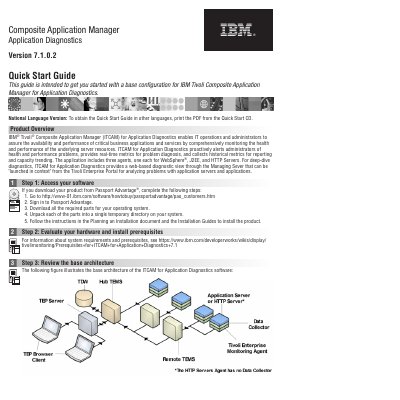
The IBM Tivoli Composite Application Manager (ITCAM) for Application Diagnostics version 7.1.0.2 is designed to help IT operations and administrators monitor the health and performance of critical business applications and underlying server resources. It provides real-time metrics for diagnosis, proactive alerts, and historical metrics for capacity trending.
The software includes three agents for WebSphere, J2EE, and HTTP Servers, and features a web-based diagnostic view through the Managing Server that can be launched from the Tivoli Enterprise Portal.
| Version | 7.1.0.2 |
|---|
The application includes three agents: one each for WebSphere, J2EE, and HTTP Servers.
Deep-dive diagnostics are available via a web-based diagnostic view through the Managing Server, which can be launched from the Tivoli Enterprise Portal.