
The IBM Security SiteProtector System SP3001 Quick Start Guide describes the process of connecting and performing the initial configuration of your IBM® Security SiteProtector System SP3001 appliance.
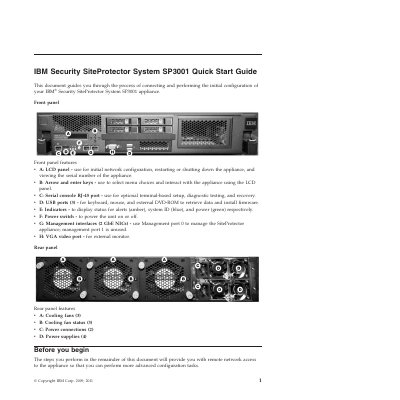
This guide covers connecting and performing the initial configuration of the IBM Security SiteProtector System SP3001 appliance. It describes front panel features such as the LCD panel, arrow and enter keys, serial console port, USB ports, indicators, power switch, management interfaces, and VGA video port, as well as rear panel cooling fans, fan status indicators, power connections, and power supplies.
Before installation, users gather materials and network information including IP address, subnet mask, default gateway, DNS server, host name, and product keys. The guide then steps through connecting the appliance, configuring network settings on the LCD panel, installing the SiteProtector Console from a web browser, and launching the console to log in and configure advanced settings.
| Management interfaces | 2 GbE NICs |
|---|---|
| USB ports | 3 |
| Cooling fans | 3 |
| Power connections | 2 |
| Power supplies | 4 |
Use Management port 0 to manage the SiteProtector appliance; management port 1 is unused.
The default user is Administrator and the password is ISSADMIN.
Point a web browser to https://
A reboot occurs after you complete your network configuration.