
The AP-130-MNT-W1 Wall Mount kit allows you to mount your 130 Series access point to a wall.
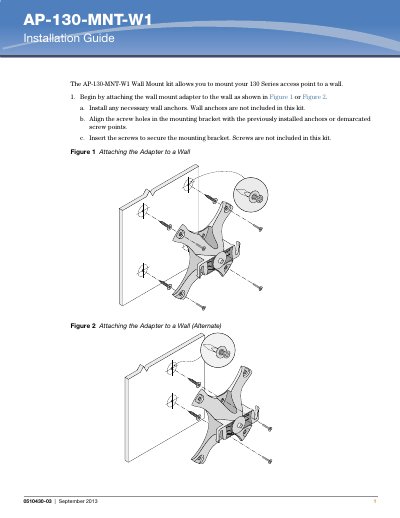
This two-page installation guide covers the AP-130-MNT-W1 wall mount kit, which allows a 130 Series access point to be mounted on a wall. It walks through attaching the wall mount adapter to the wall, using either of the two mounting positions shown, and then securing the access point to the mounted adapter.
The guide notes that wall anchors and screws are not included in the kit. It instructs the installer to connect any necessary cables and antennas to the access point before attaching it, then to place the AP against the adapter and rotate it clockwise until it clicks into place. Figures show the adapter on the wall, the AP being attached and the completed installation.
| Compatible access points | 130 Series access points |
|---|---|
| Mounting angle when attaching the AP | Approximately 30 degrees |
| Wall anchors | Not included in the kit |
| Screws | Not included in the kit |
It lets you mount a 130 Series access point to a wall.
No. The guide states that wall anchors and screws are not included in this kit, so any necessary anchors must be installed separately.
The AP should be placed so that its mounting tabs are at an angle of approximately 30 degrees to the adapter.
Push toward the wall while rotating the AP clockwise until it clicks into place.