
The Dell™ E-Port Plus User’s Guide provides information on how to set up and use the E-Port Plus.
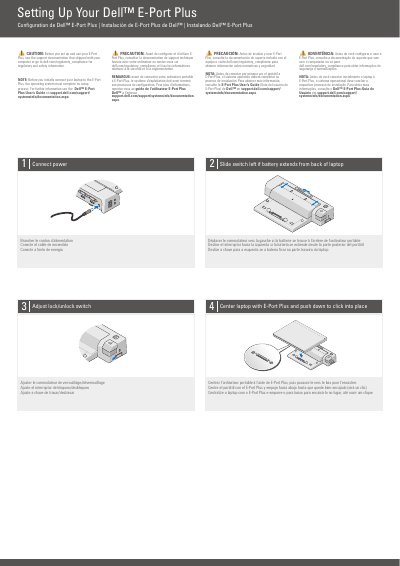
This two-page Dell E-Port Plus quick setup guide provides multilingual instructions for setting up the E-Port Plus with a laptop. It covers connecting power, positioning the laptop so it clicks into place, and adjusting the lock/unlock switch.
The guide also identifies the E-Port Plus controls and connectors, including the battery bar adjuster, alignment mark, power and eject buttons, security cable slot, docking connector, and the ports listed on the second page. It includes safety and regulatory notices in English, French, Spanish, and Portuguese.
| DVI connectors | 2 |
|---|---|
| Audio connectors | 2 |
| USB connectors | 3 |
| DisplayPort connectors | 2 |
| PS/2 connectors | 2 |
The operating system must complete its setup process before the laptop is initially connected to the E-Port Plus.
Center the laptop with the E-Port Plus and push down until it clicks into place.
Slide the switch to the left.
See the support documentation shipped with your computer or go to dell.com/regulatory_compliance.