
Dell™ Workgroup Laser Printer M5200 User's Guide
This guide explains how to set up and operate the Dell M5200 workgroup laser printer, including installing drivers, managing toner, using the Status Monitor, and configuring network settings. It also covers software utilities like Driver Profiler and the Dell Printer Configuration Web Tool for networked environments.
The guide includes safety information, warranty details, and instructions for ordering supplies via Dell’s website or phone. It supports multiple operating systems and provides troubleshooting resources through the Dell Support Website.
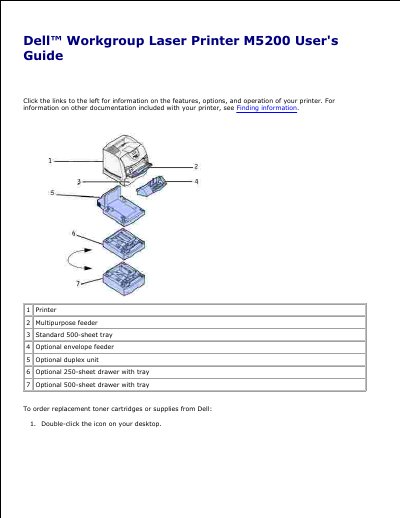
It is a printer that includes a multipurpose feeder, a standard 500-sheet tray, and optional components like an envelope feeder and duplex unit.
You can order them by visiting the Dell website or by calling the number listed under the By Telephone heading.
The Status Monitor launches when you send a print job and only appears on the computer screen when an error or warning occurs.