
The LATITUDE 3340 Quick Start Guide describes how to connect the power adapter and turn on your computer, finish Windows setup, enable security and updates, connect to your network, and sign in to your Microsoft account or create a local account.
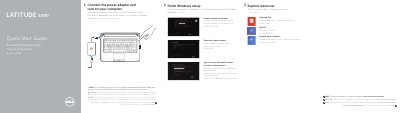
This document provides quick start instructions for the Dell Latitude 3340 computer, specifically for units shipped with the Windows 8.1 operating system. It guides users through connecting power, completing the Windows setup, enabling security updates, connecting to a network, and signing into a Microsoft account. For users of Windows 7 or Ubuntu, the guide directs them to follow onscreen setup instructions.
| Input Voltage | 100 V CA–240 V CA |
|---|---|
| Input Current (Max) | 1,7 A (65 W)/2,5A (90 W) |
| Input Frequency | 50 Hz–60 Hz |
| Output Voltage | 19,5 VCC |
The instructions are specifically for computers shipped with the Windows 8.1 Operating System.
You should follow the onscreen setup instructions instead of the printed guide.
More information is available in the Owner's Manual at dell.com/support/manuals.